NOW LIVE In 178 countries · App Store · Google Play · Web

Know your business,
down to the last item.

Fixtock brings stock, sales, expenses and real-time profit into one beautifully simple app, so you always know what you have, what you sold, who sold it and what you actually earned.
iPhone & Android iPad & tablets Any browser
  • Free plan to start
  • Every store in one place
  • Any currency, any time zone
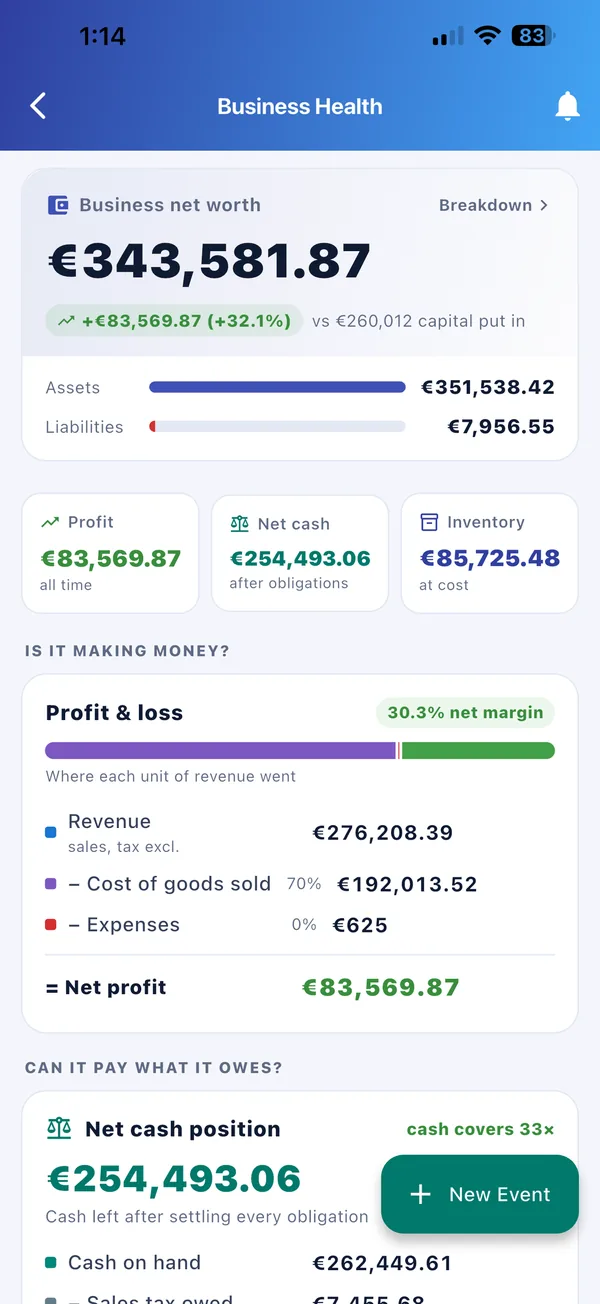
Fixtock Business Health: net worth, profit and loss, and net cash position
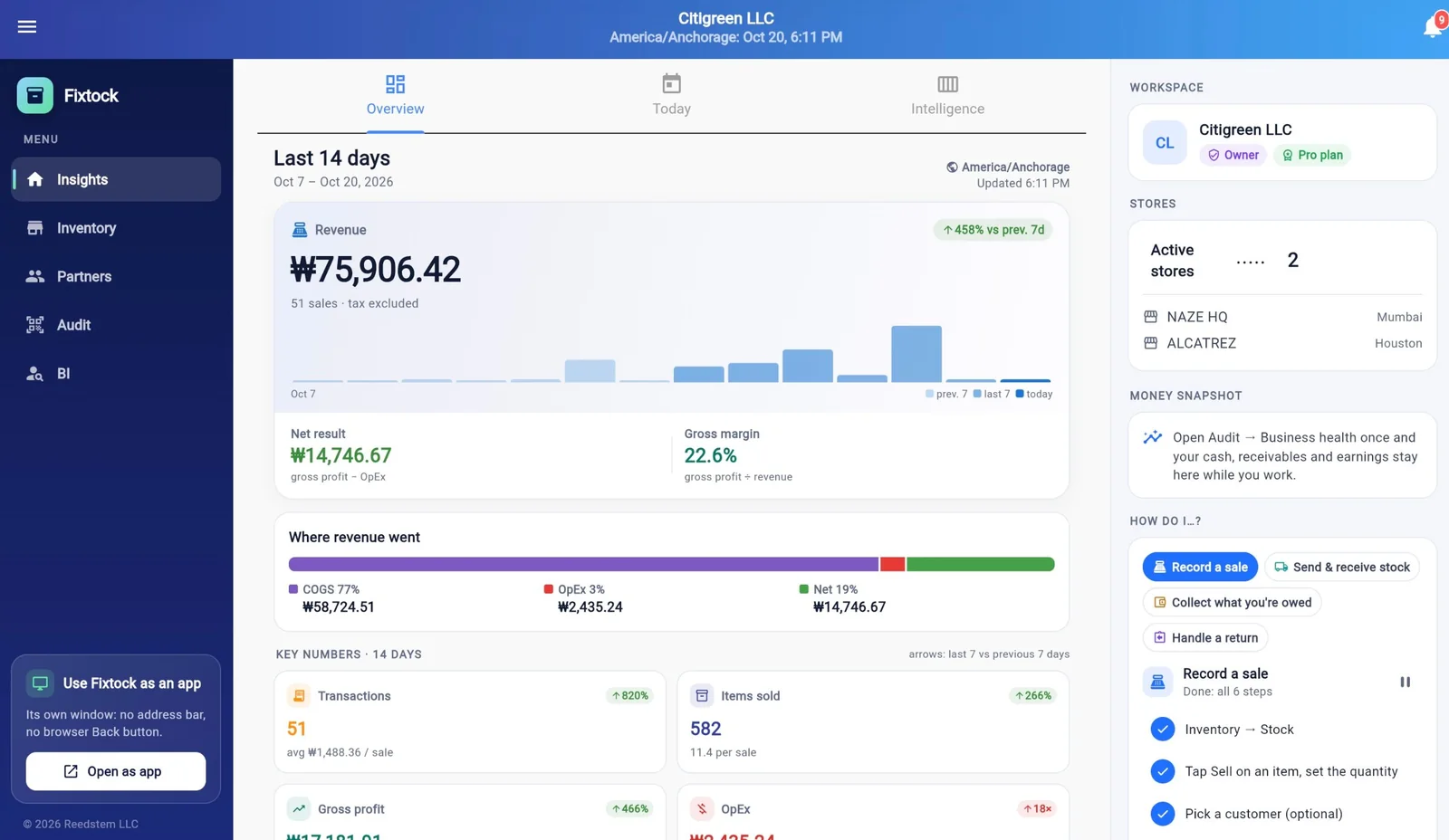
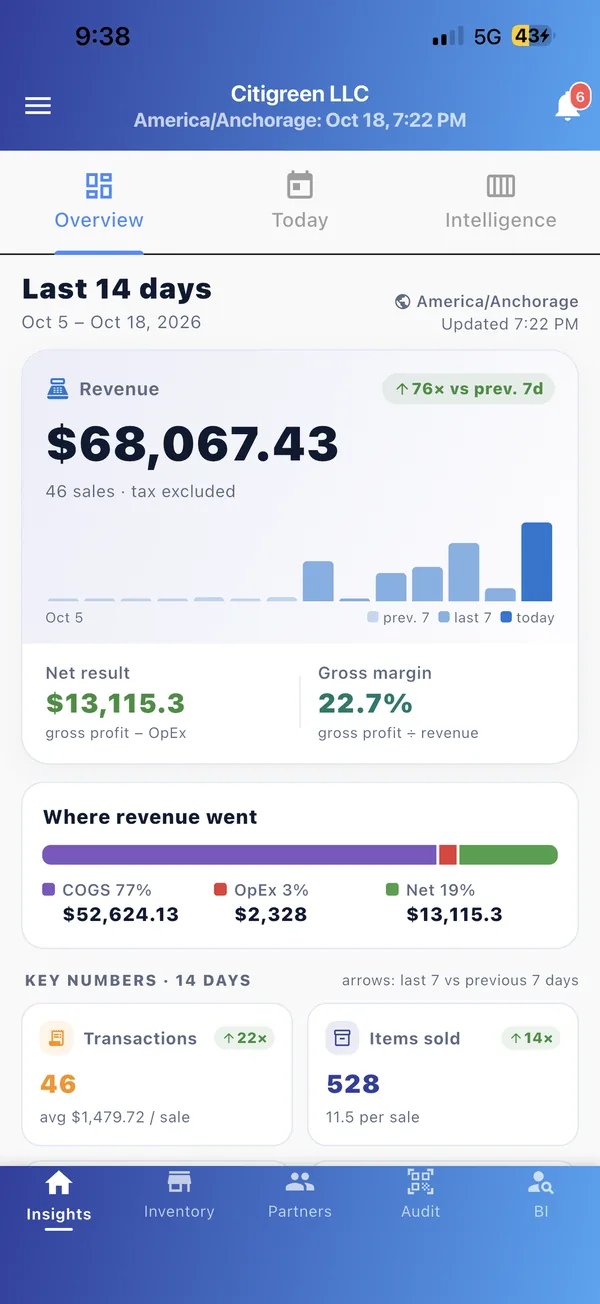
Fixtock Overview: 14-day revenue, net result, gross margin and where revenue went
Every itemStock, batches, costs & prices
Every saleRecorded, timed and attributed
Every storeTransfers, audits & counts
Every currencyProfit, margin & expenses in yours
Take the tour

Your whole business, one tap away.

Insights, stock and money, all connected. Pick a screen to see what it tells you.
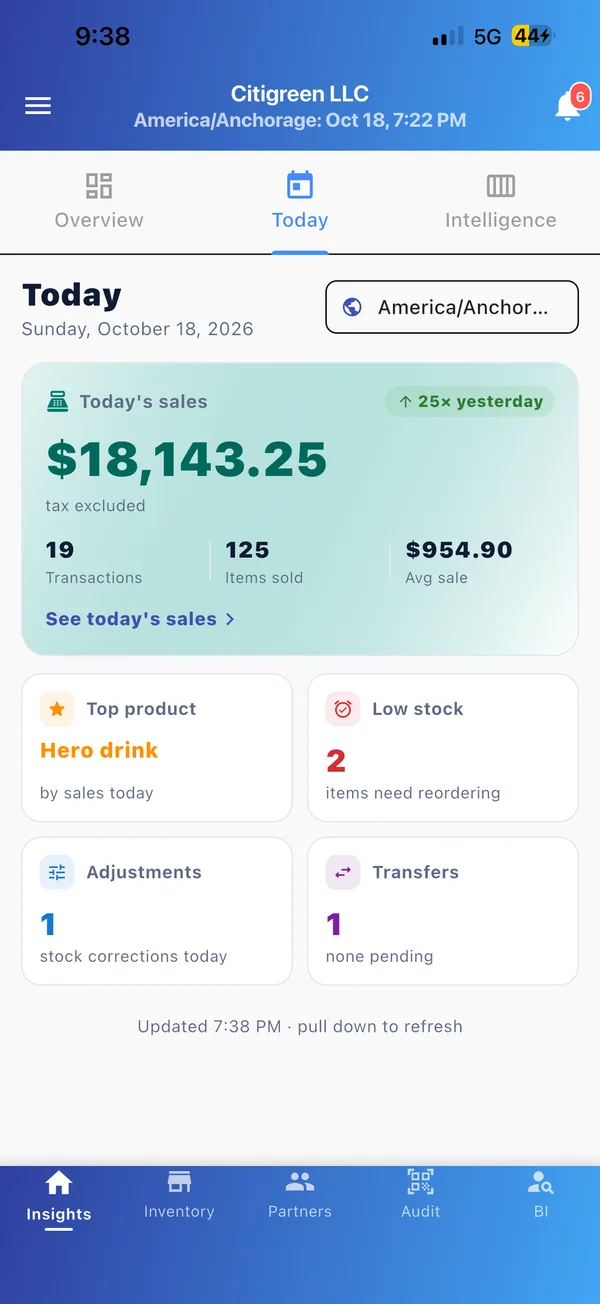
    • Today’s sales, transactions, items sold and average sale
    • Compared with yesterday, as a percentage or a multiple
    • Top product, low stock, adjustments and transfers at a glance
    • Revenue, net result and gross margin, worked out for you
    • “Where revenue went”: cost of goods, expenses and what you kept
    • Key numbers with trends against the previous 7 days
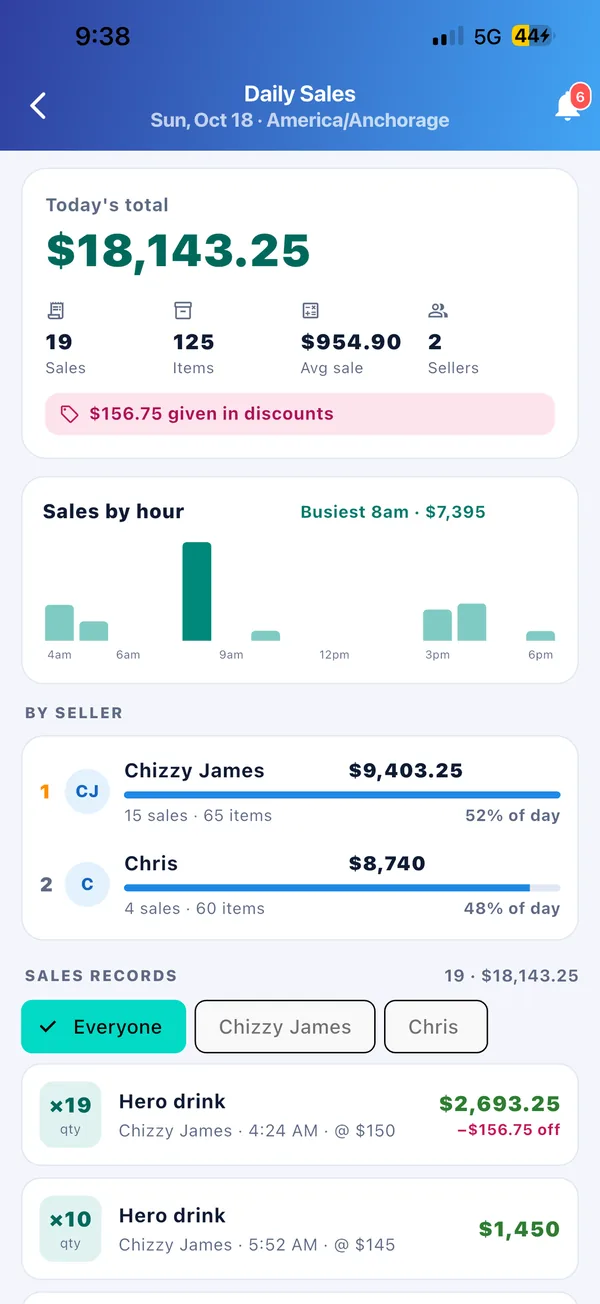
    • Today’s total, items, average sale and discounts given
    • Sales by hour, with your busiest hour called out
    • Each seller’s share of the day, and every sale record
    • Business net worth: assets against liabilities
    • Profit and loss, from revenue down to net profit
    • Net cash position after every obligation
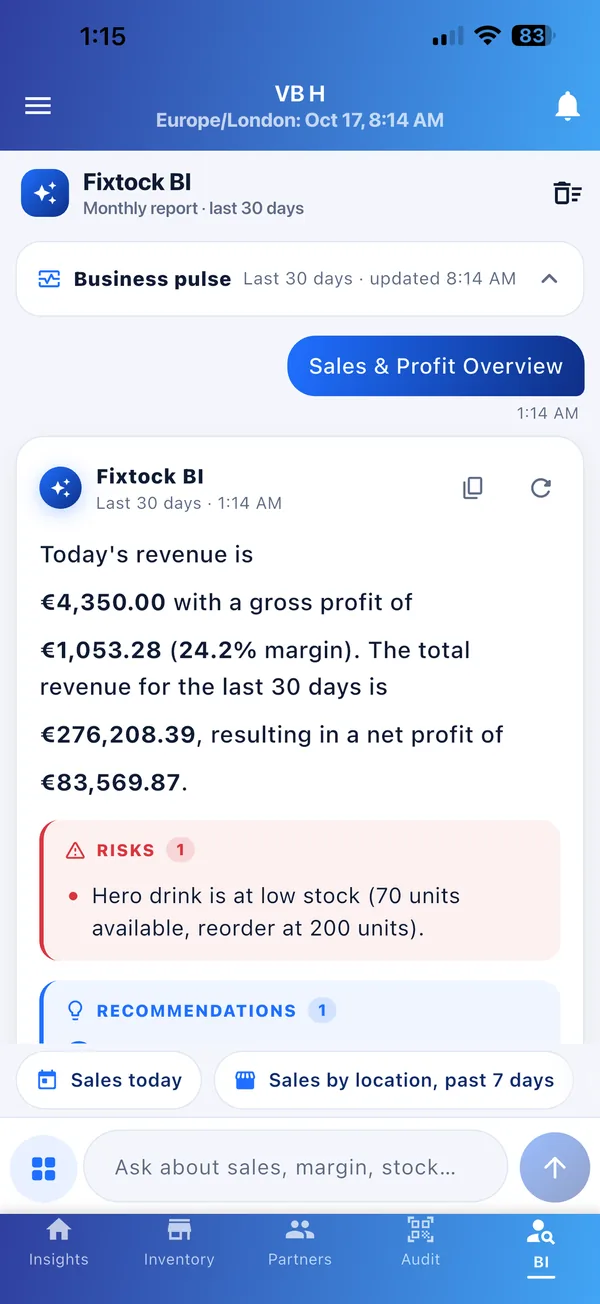
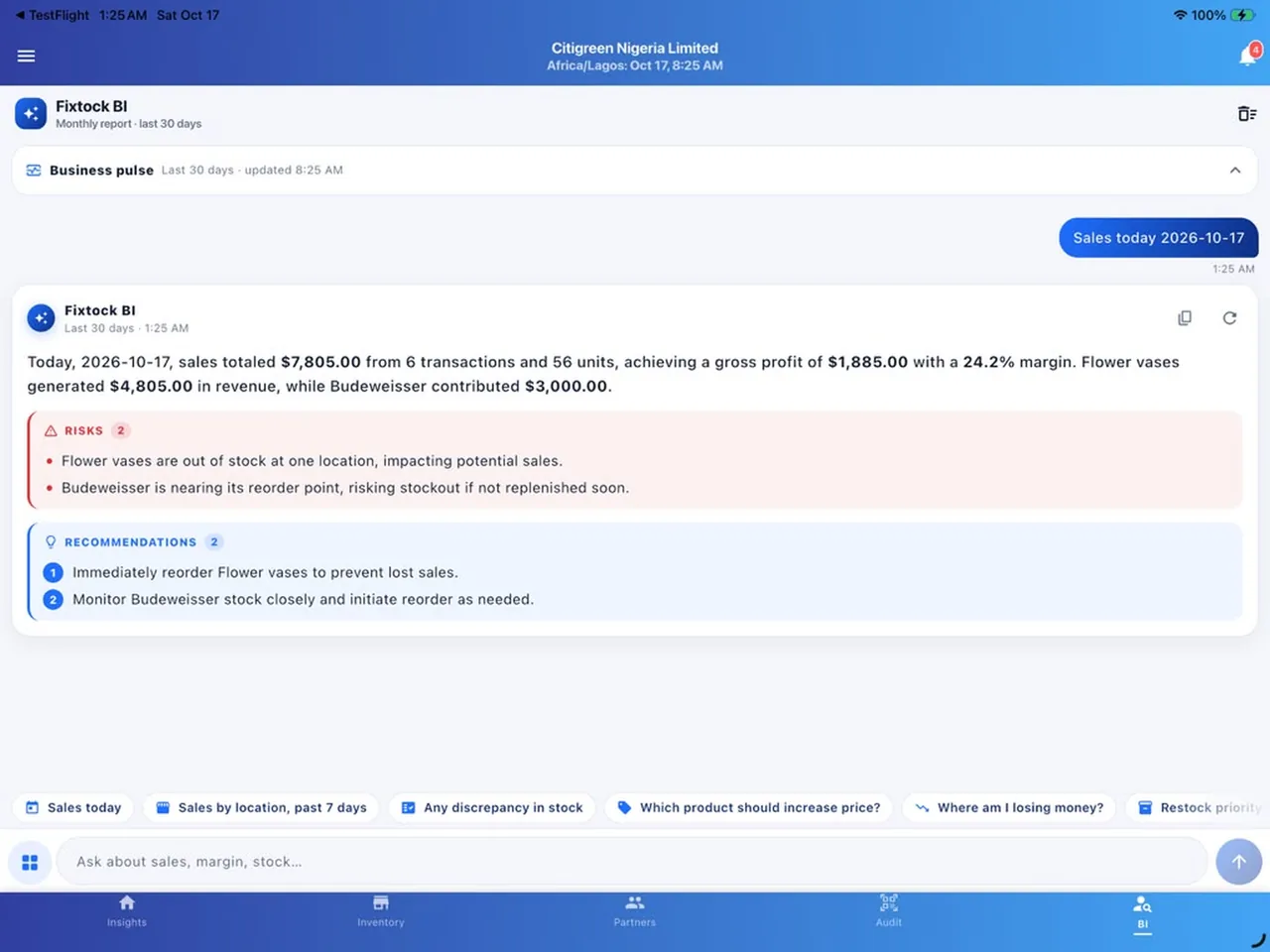
    • A monthly report written from your own numbers
    • Risks flagged early, such as low stock on a best seller
    • Recommendations you can act on today
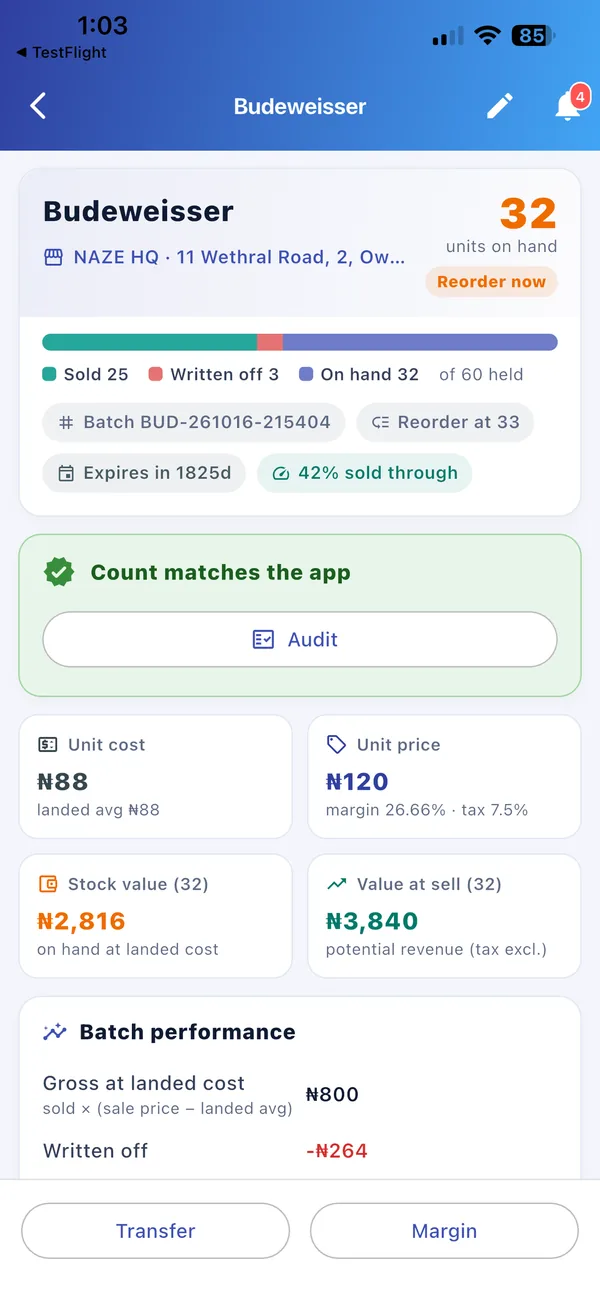
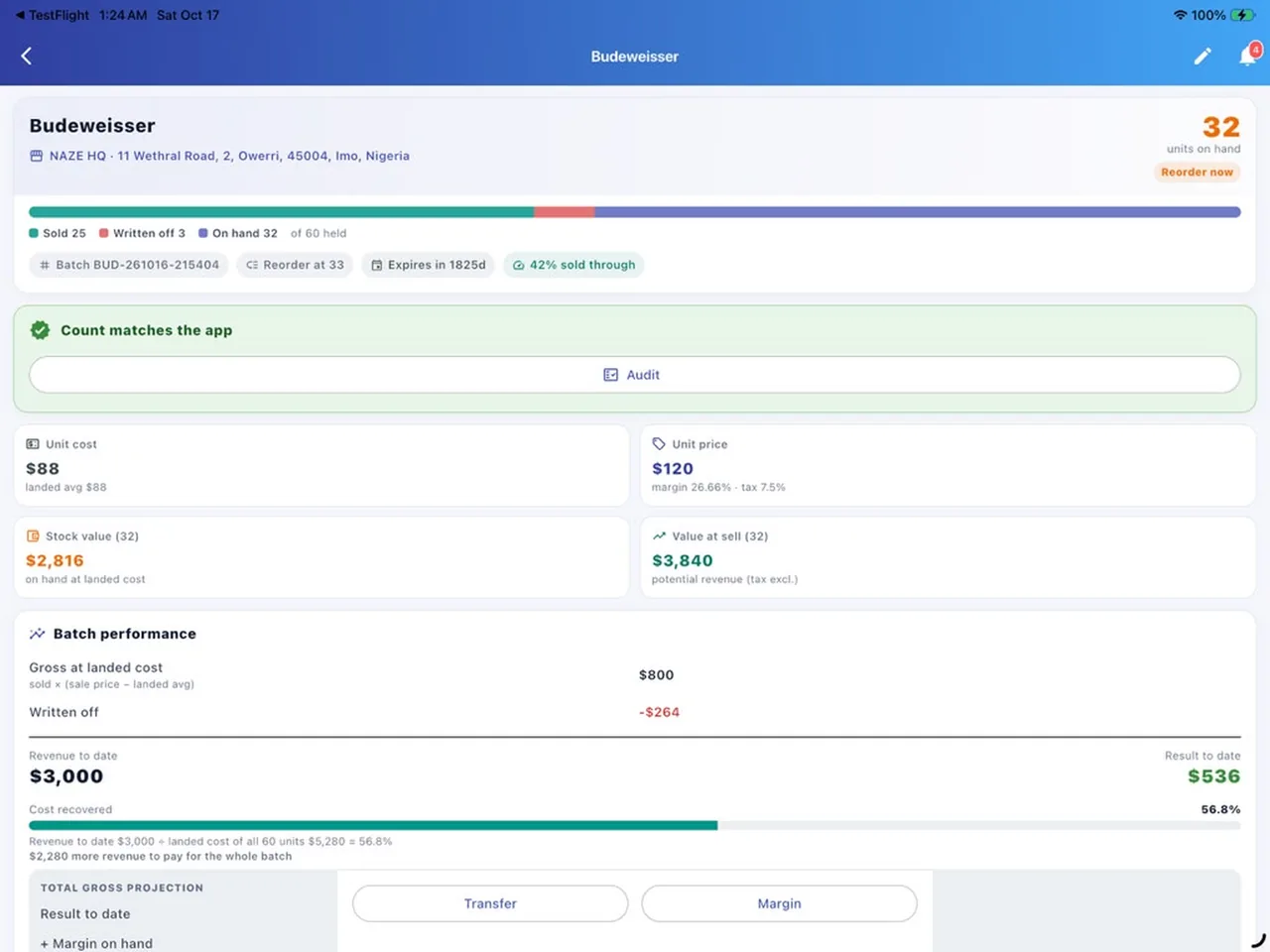
    • Sold, written off and on hand, against what was held
    • Unit cost, unit price, margin and expiry per batch
    • Reorder alerts and sell-through rate
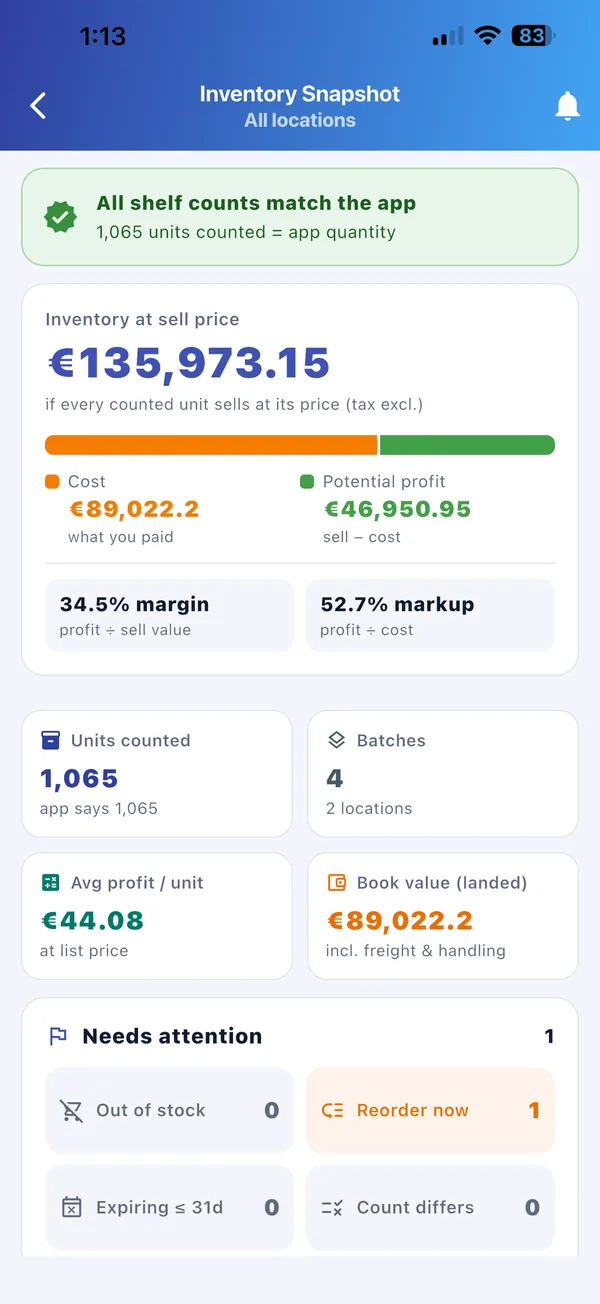
    • Value at sell price, cost and potential profit
    • Margin and markup across all stores
    • Needs attention: out of stock, reorder now, expiring, count differs
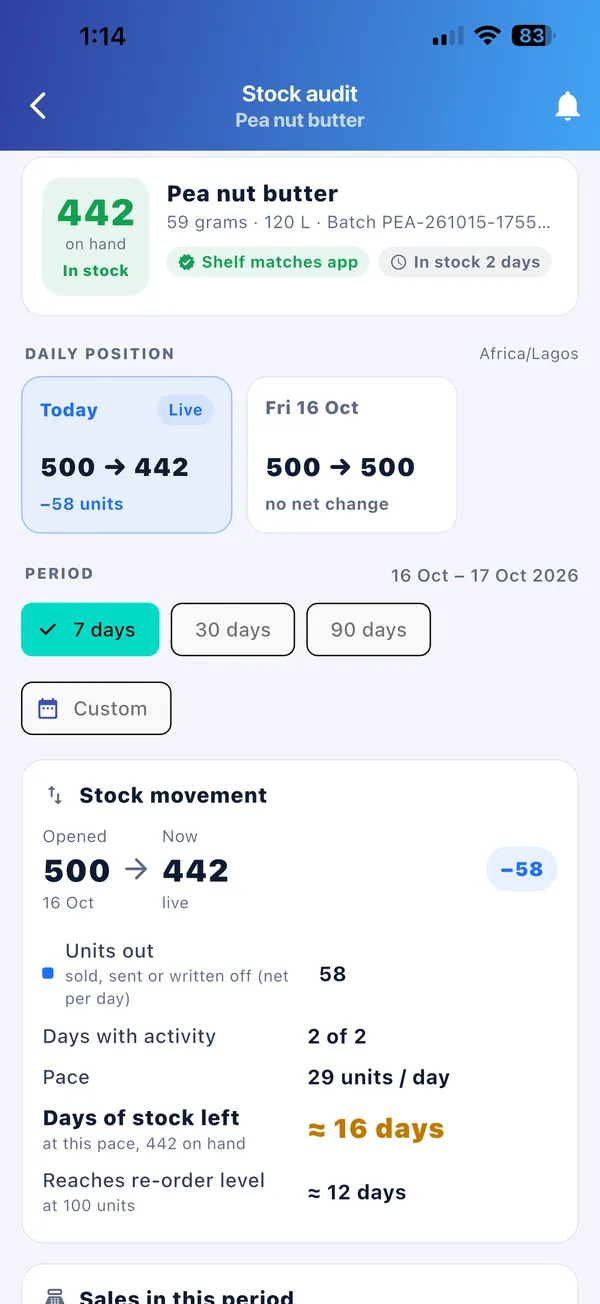
    • Daily position: opening stock to live stock
    • Shelf counts checked against the app
    • Days of stock left and when you’ll hit the reorder level
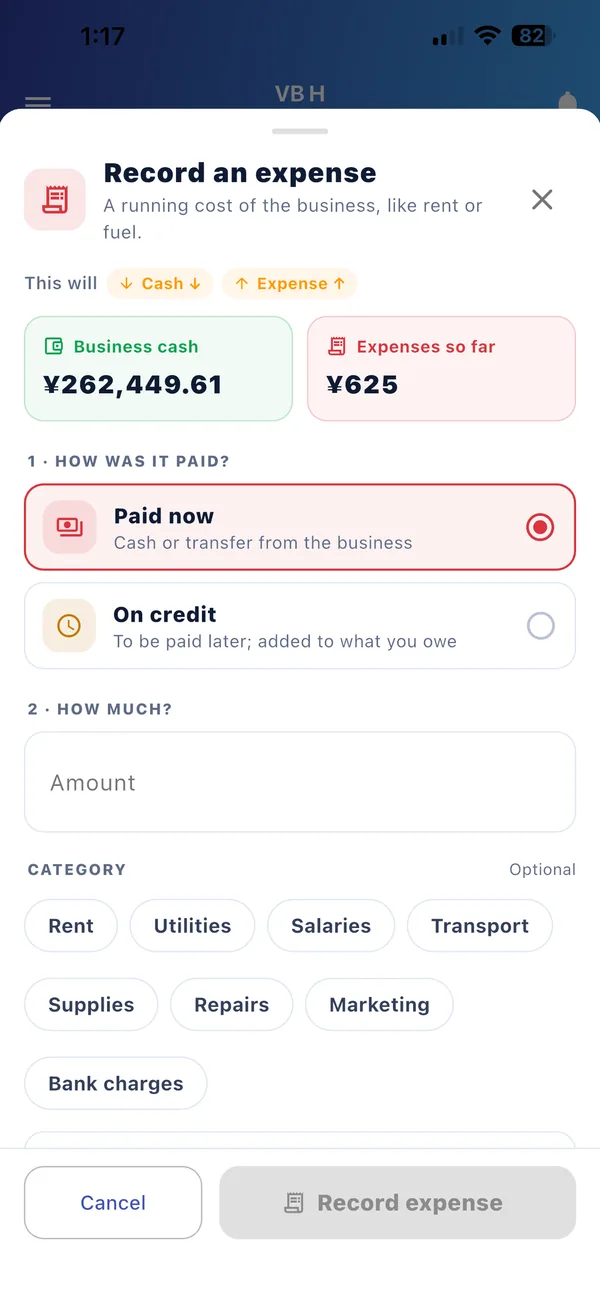
    • Paid now or on credit, by category
    • Shows the effect on cash and expenses before you save
    • Rent, utilities, salaries, transport, repairs and more
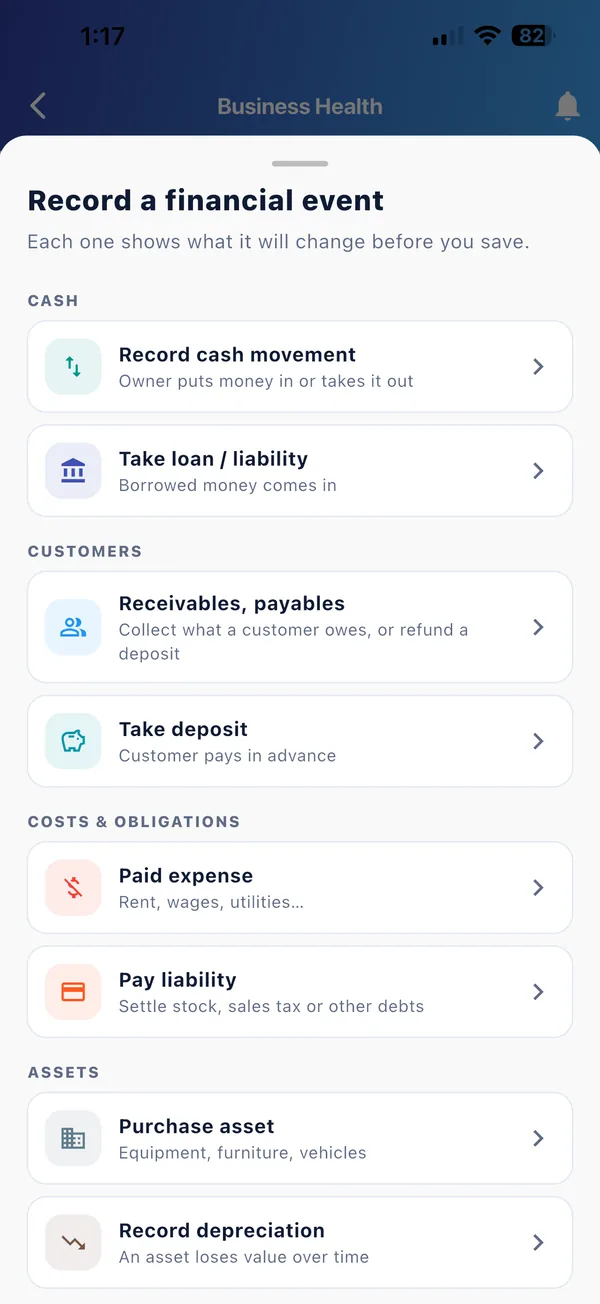
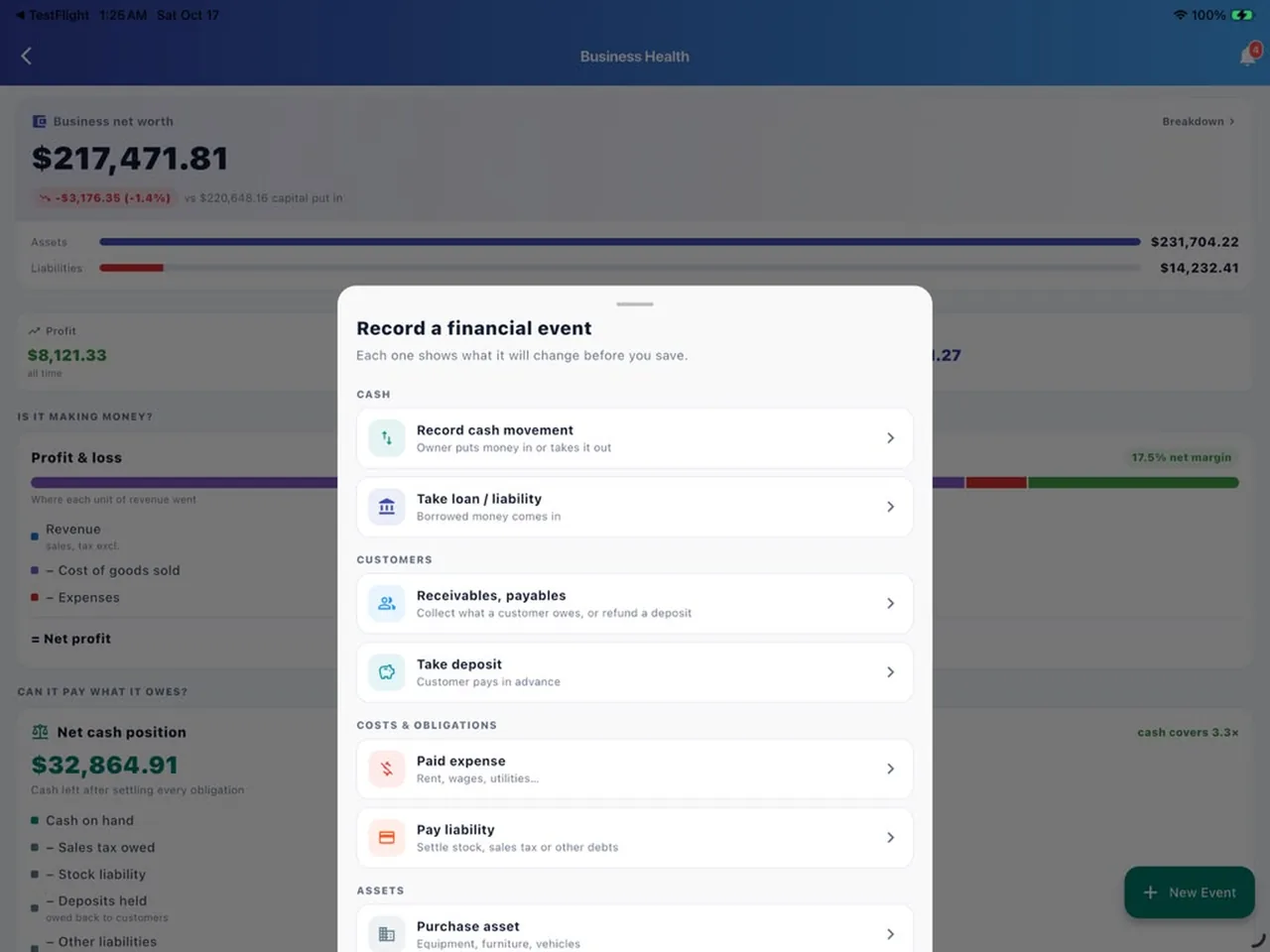
    • Cash movements, loans, deposits and receivables
    • Expenses, liabilities, assets and depreciation
    • Each one shows what it will change before you save
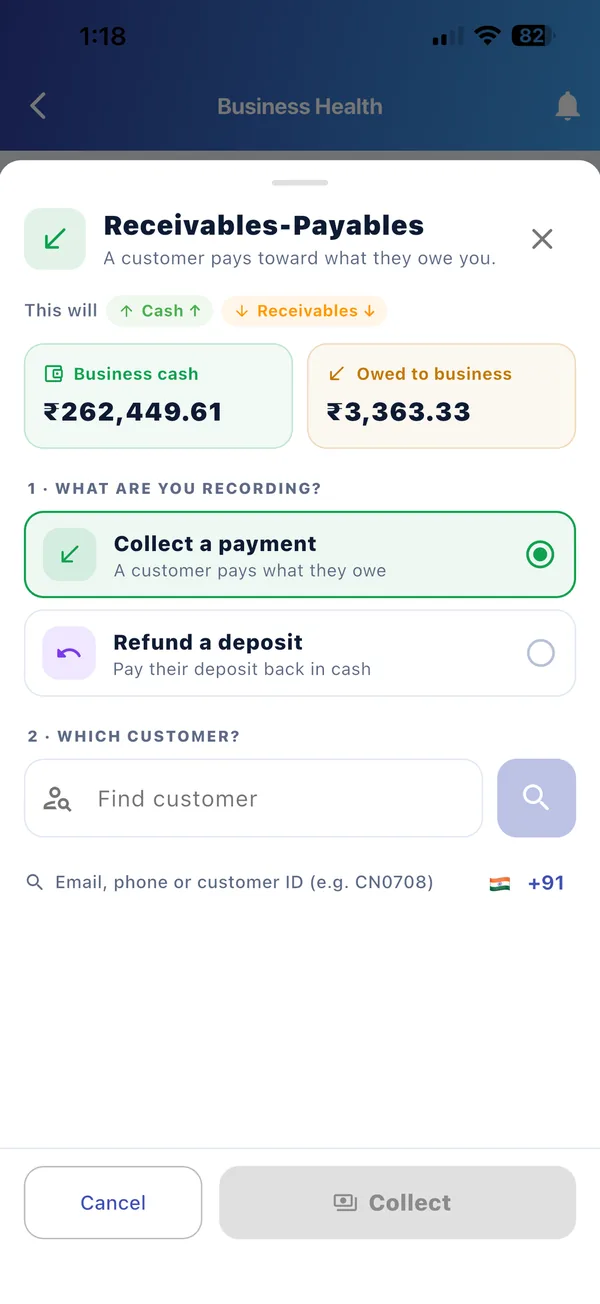
    • Find a customer by email, phone or customer ID
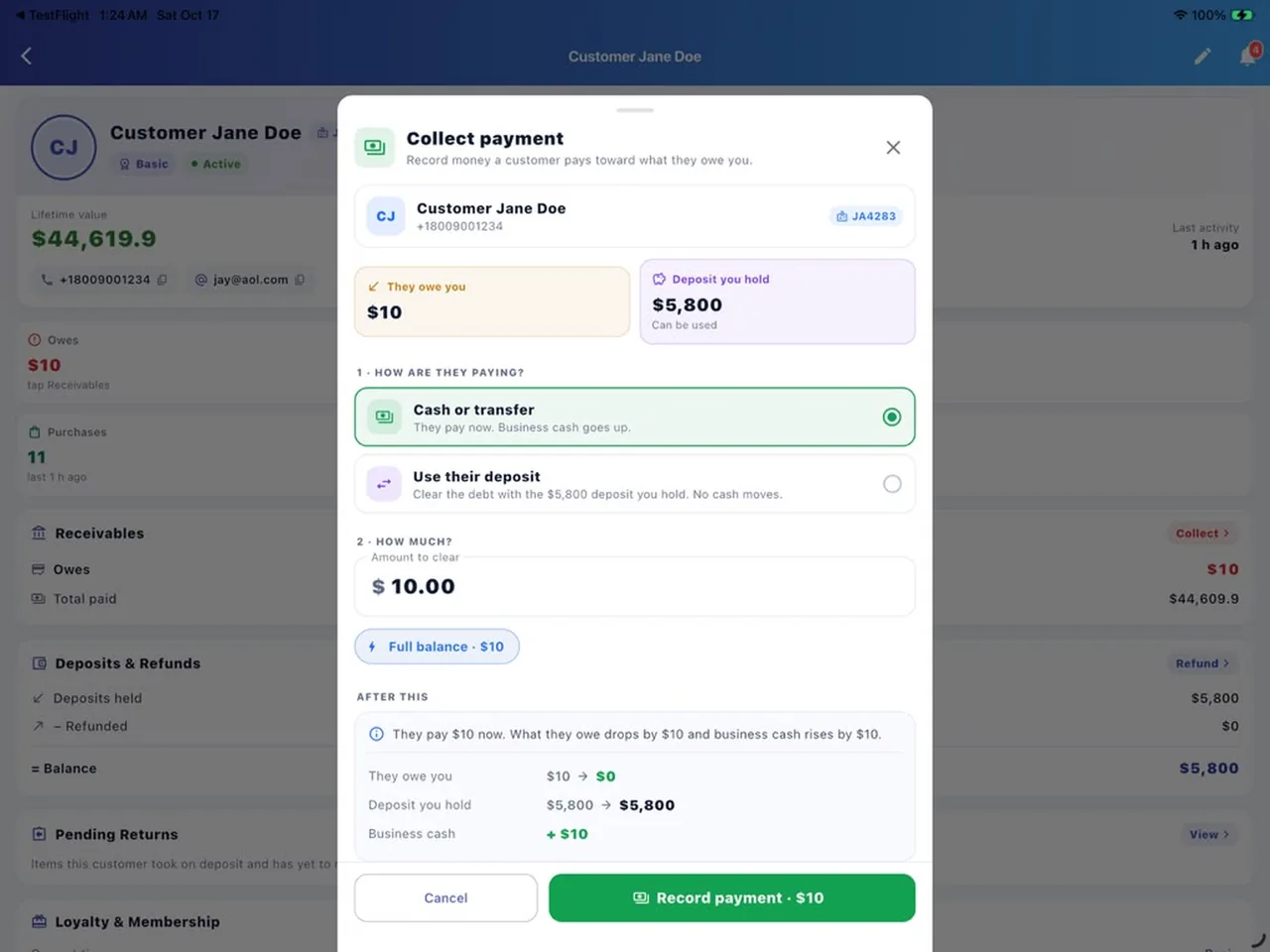
    • Collect a payment or refund a deposit
    • Balances that always settle correctly
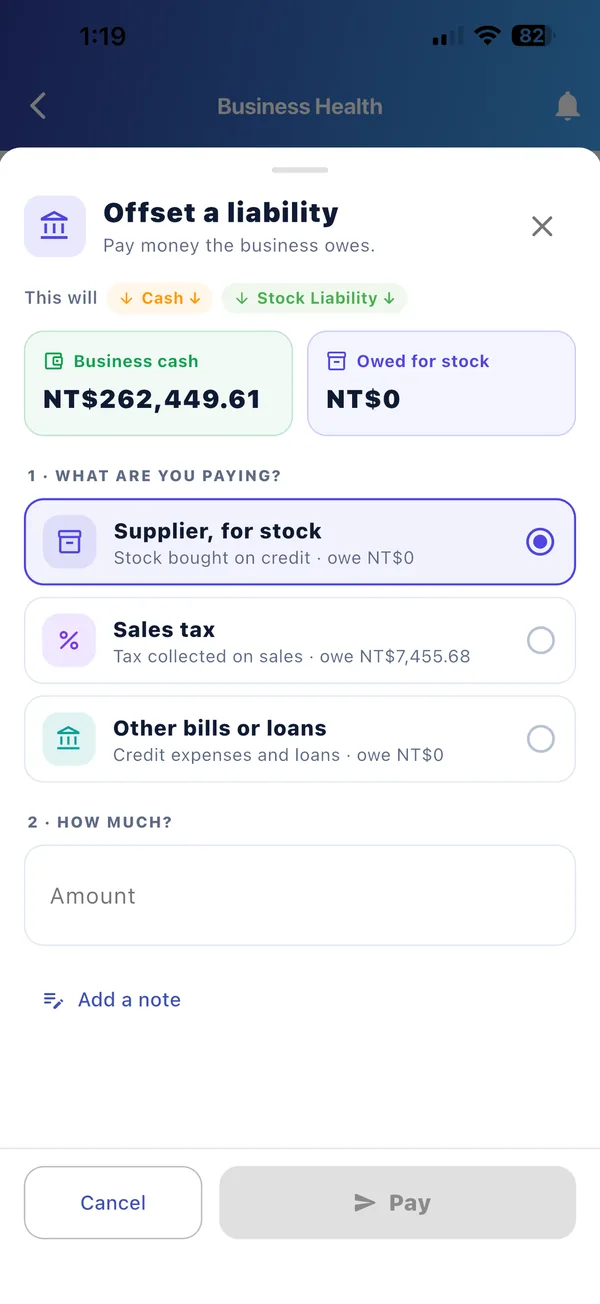
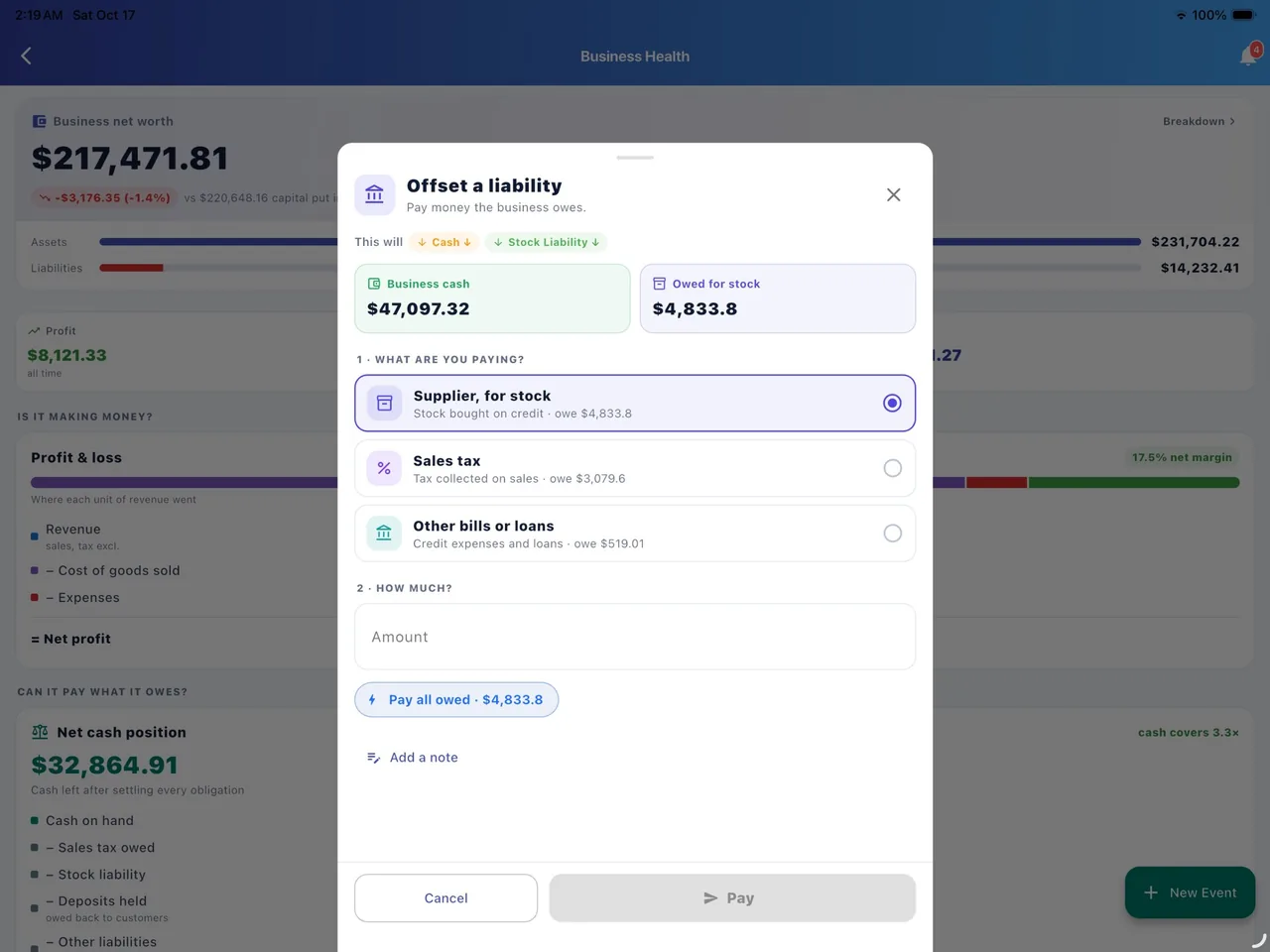
    • Stock bought on credit, sales tax collected, other bills
    • See what is owed beside your business cash
    • Pay in part or in full
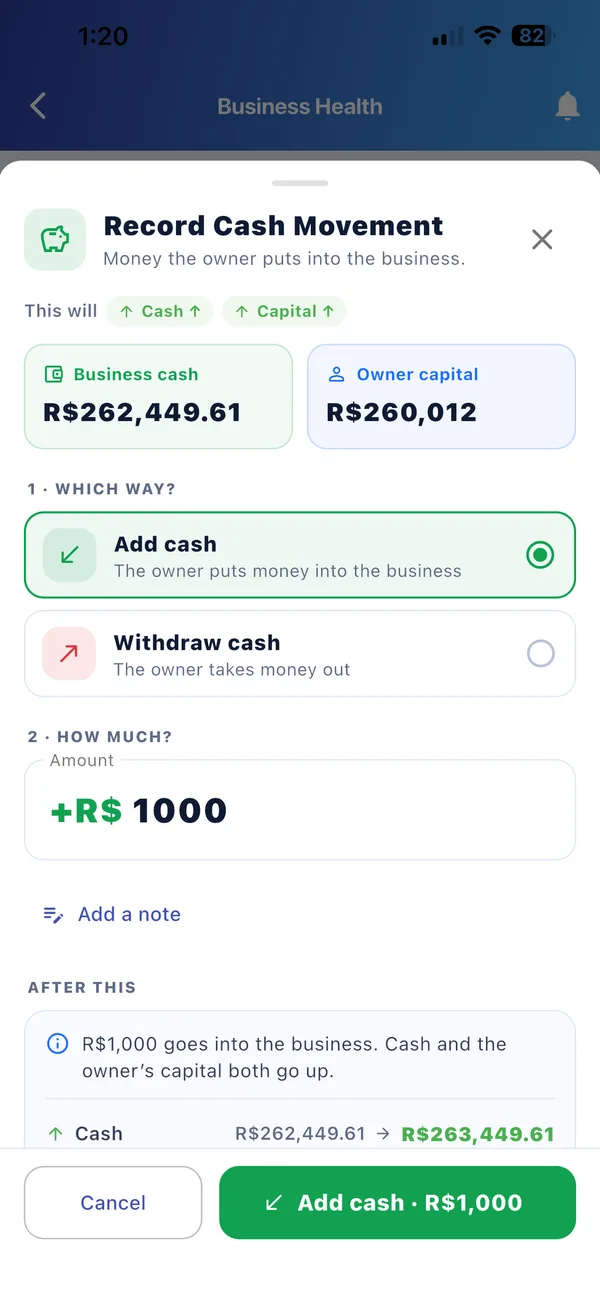
    • Owner adds cash to the business or takes it out
    • Capital and cash update together
    • A clear summary of the result before you confirm
Today: today's sales, transactions, items sold, average sale, top product, low stock, adjustments and transfers Overview: revenue, net result, gross margin and where revenue went over the last 14 days Daily sales: today's total, sales by hour, sales by seller and each sale record Business Health: net worth, profit and loss, and net cash position Fixtock BI assistant: plain-language business report with risks and recommendations Stock details: batch sold, written off and on hand, with cost, price and margin Inventory snapshot: stock value at sell price, cost, potential profit and items needing attention Stock audit: shelf count versus app, stock movement and days of stock left Record an expense: paid now or on credit, with categories Record a financial event: cash, customers, costs, obligations and assets Receivables and payables: collect a customer payment or refund a deposit Offset a liability: pay suppliers, sales tax and other bills Record cash movement: the owner adds or withdraws cash
1 / 11

Tap a screen to see it full size

One account, every screen

On the shop floor, in the office, on the go.

Sell from a phone at the counter, review the books on a tablet, and run reports from any computer. Same account, same numbers.

Fixtock BI assistant on iPhone

Your business in your pocket

Record sales at the counter, check stock on the shelf and get alerts the moment something needs you.
  • Sell, return and share receipts in seconds
  • Low stock, transfer and daily summary alerts
  • Face ID, Touch ID or fingerprint to unlock

Always in sync. A sale on the phone shows on the tablet and the web as it happens.

Overview in US dollars (America/Anchorage) Business Health in euros Recording an expense in yen Owner cash in Brazilian reais Paying a supplier in New Taiwan dollars
Global by design

178 countries. Every currency. Your business day.

From New York to Lagos, Seoul to São Paulo, each company sets its own currency and time zone, so “today”, “this week” and every receipt match the way you actually trade.

  • Figures, reports and receipts all in your currency
  • Days and hours counted in your store’s time zone
  • Sales tax handled at your rate
  • Stores in different cities and time zones under one company
  • $ US Dollar
  • € Euro
  • £ Pound
  • ¥ Yen
  • ₩ Won
  • ₹ Rupee
  • R$ Real
  • C$ Canadian Dollar
  • A$ Australian Dollar
  • CHF Franc
  • AED Dirham
  • R Rand
  • ₦ Naira
  • NT$ Taiwan Dollar
  • + every other currency
Built for iPad

The back office, on a big screen.

Performance, transactions, payments and statements, with room to breathe.
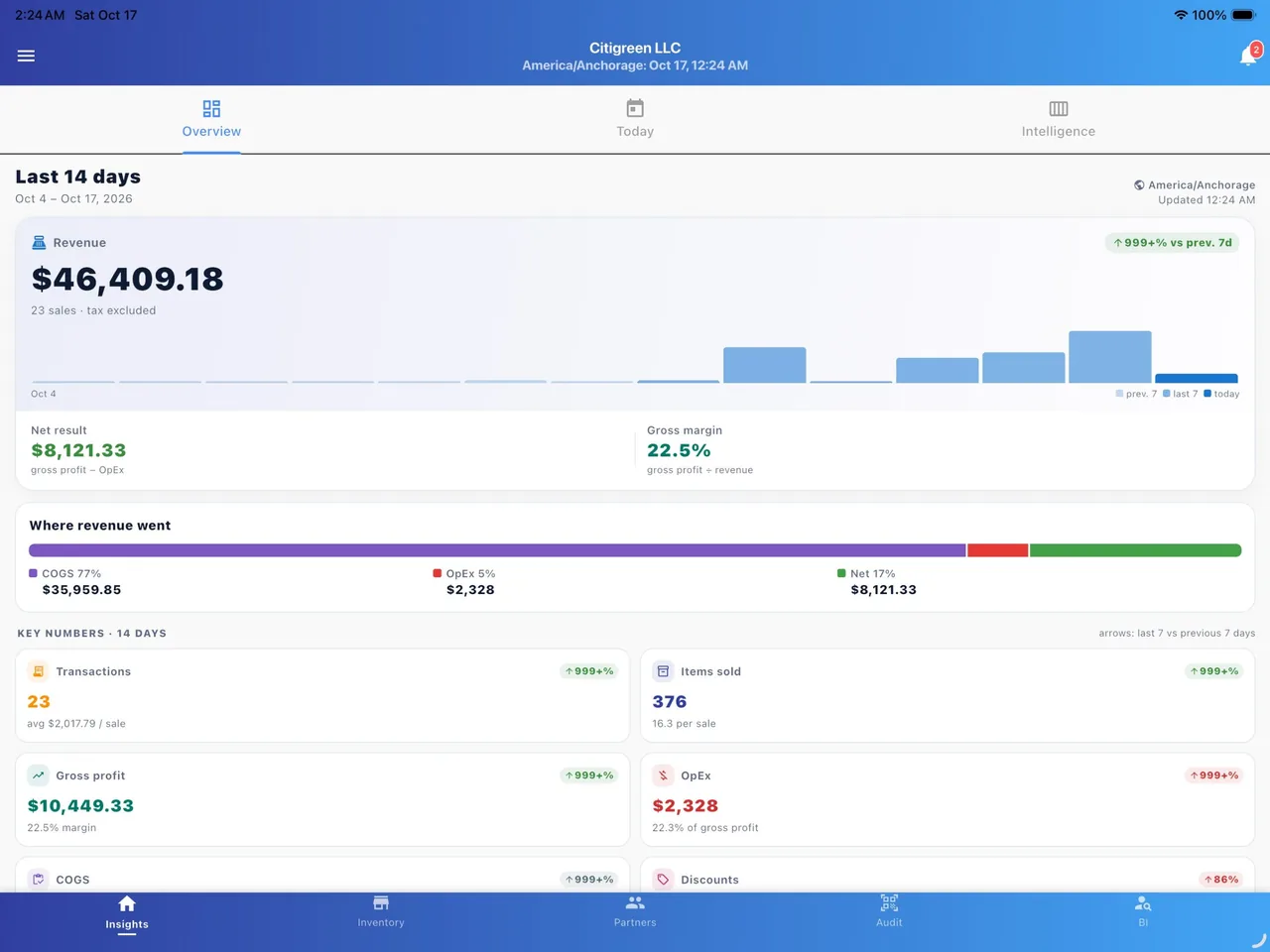
Overview on a big screen on iPad: Revenue, net result and margin for the last 14 days, with room to see it all.
Overview on a big screenRevenue, net result and margin for the last 14 days, with room to see it all.
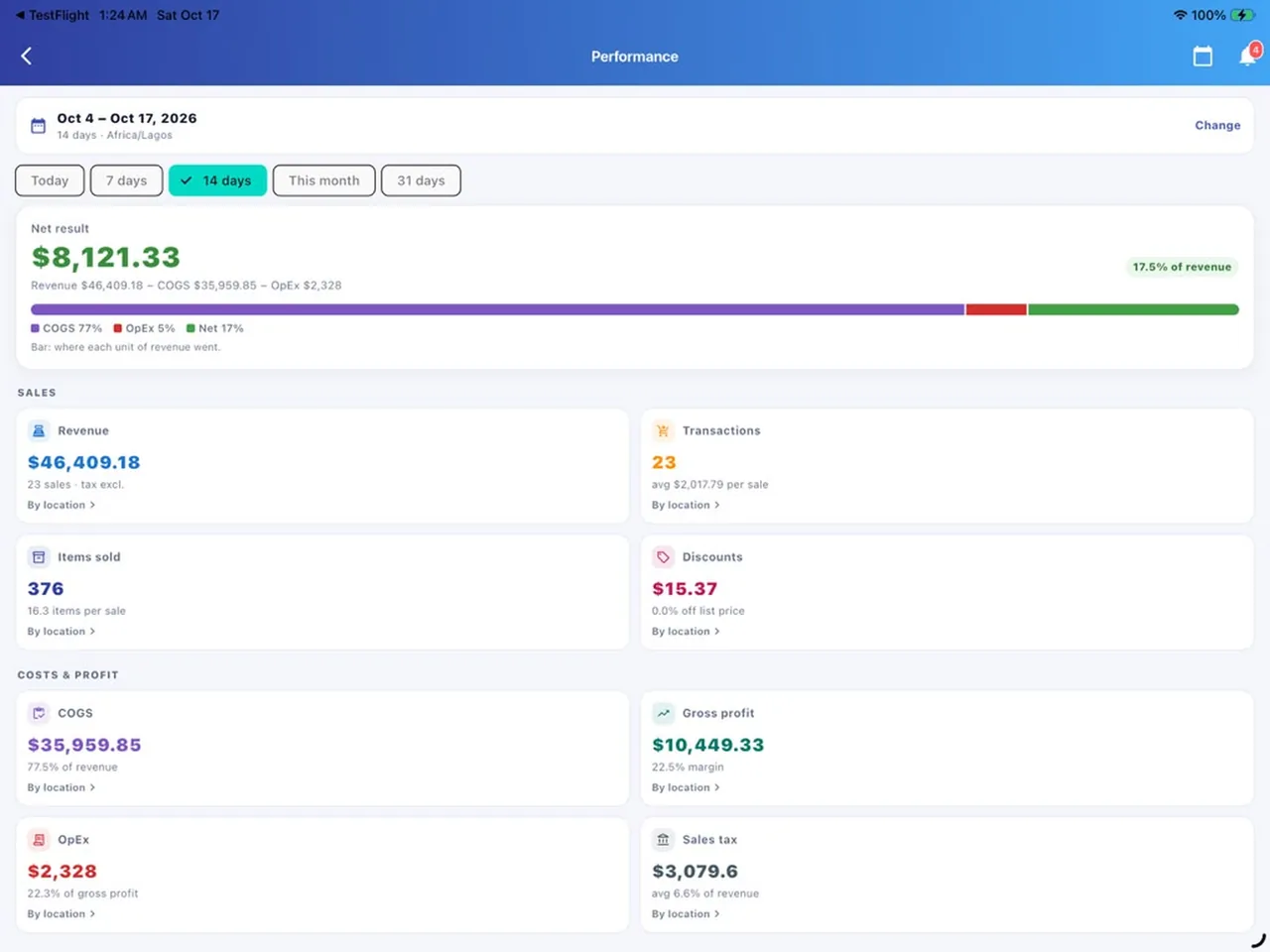
Performance for any period on iPad: Revenue, items sold, discounts, cost of goods, expenses and sales tax, by location.
Performance for any periodRevenue, items sold, discounts, cost of goods, expenses and sales tax, by location.
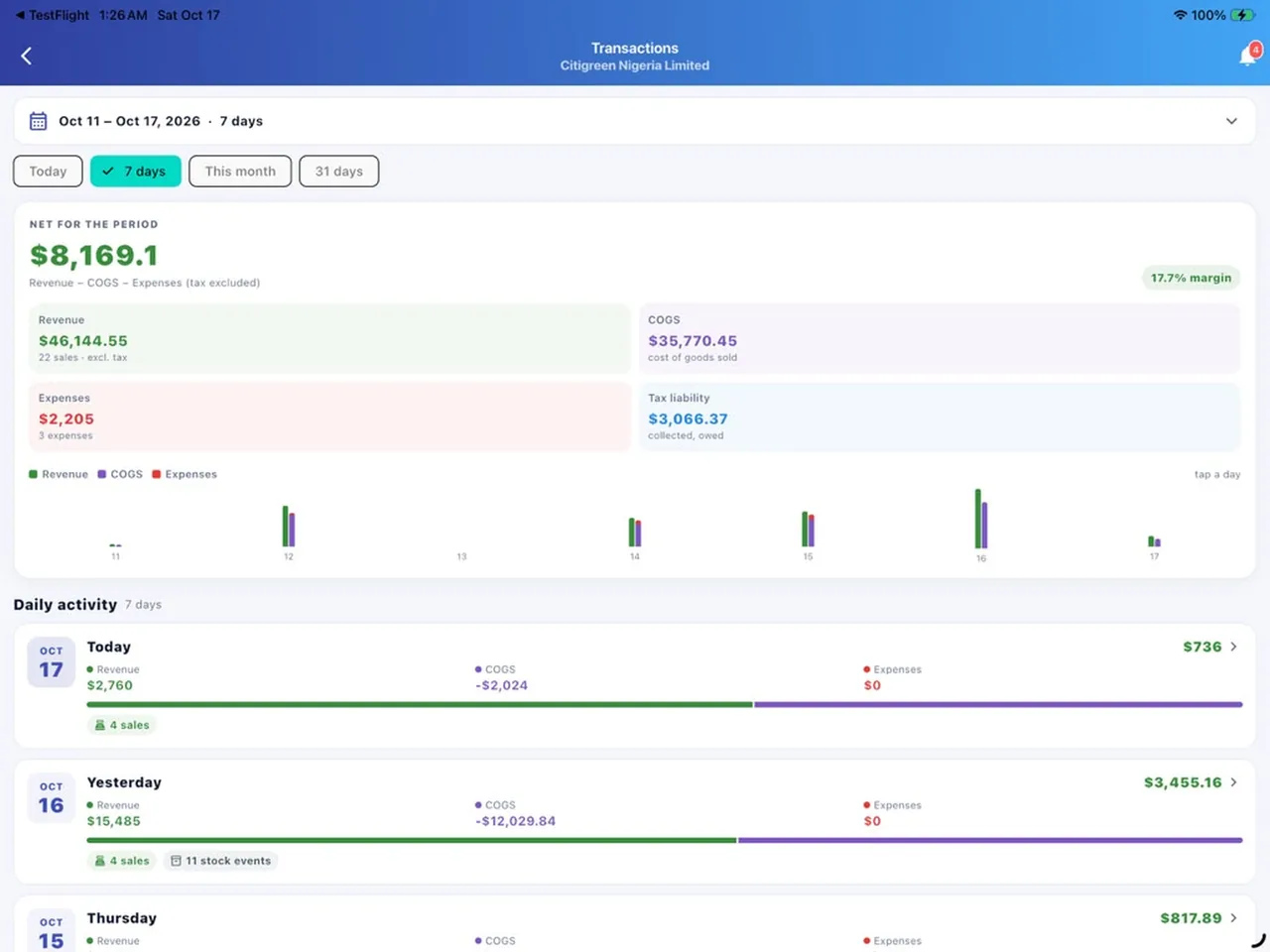
Transactions, day by day on iPad: Revenue, cost of goods, expenses and tax for each day, with a chart of the period.
Transactions, day by dayRevenue, cost of goods, expenses and tax for each day, with a chart of the period.
Ask Fixtock BI on iPad: “Sales today” answered in seconds, with risks and recommendations.
Ask Fixtock BI“Sales today” answered in seconds, with risks and recommendations.
Batch performance on iPad: Gross profit at landed cost, write-offs and how much of the cost you’ve recovered.
Batch performanceGross profit at landed cost, write-offs and how much of the cost you’ve recovered.
Collect a customer payment on iPad: Cash, transfer or a customer’s deposit, with the result shown before you record it.
Collect a customer paymentCash, transfer or a customer’s deposit, with the result shown before you record it.
Record any financial event on iPad: Cash, customers, costs, obligations and assets, all from one sheet.
Record any financial eventCash, customers, costs, obligations and assets, all from one sheet.
Pay what you owe on iPad: Suppliers, sales tax and other bills, beside the business’s cash position.
Pay what you oweSuppliers, sales tax and other bills, beside the business’s cash position.
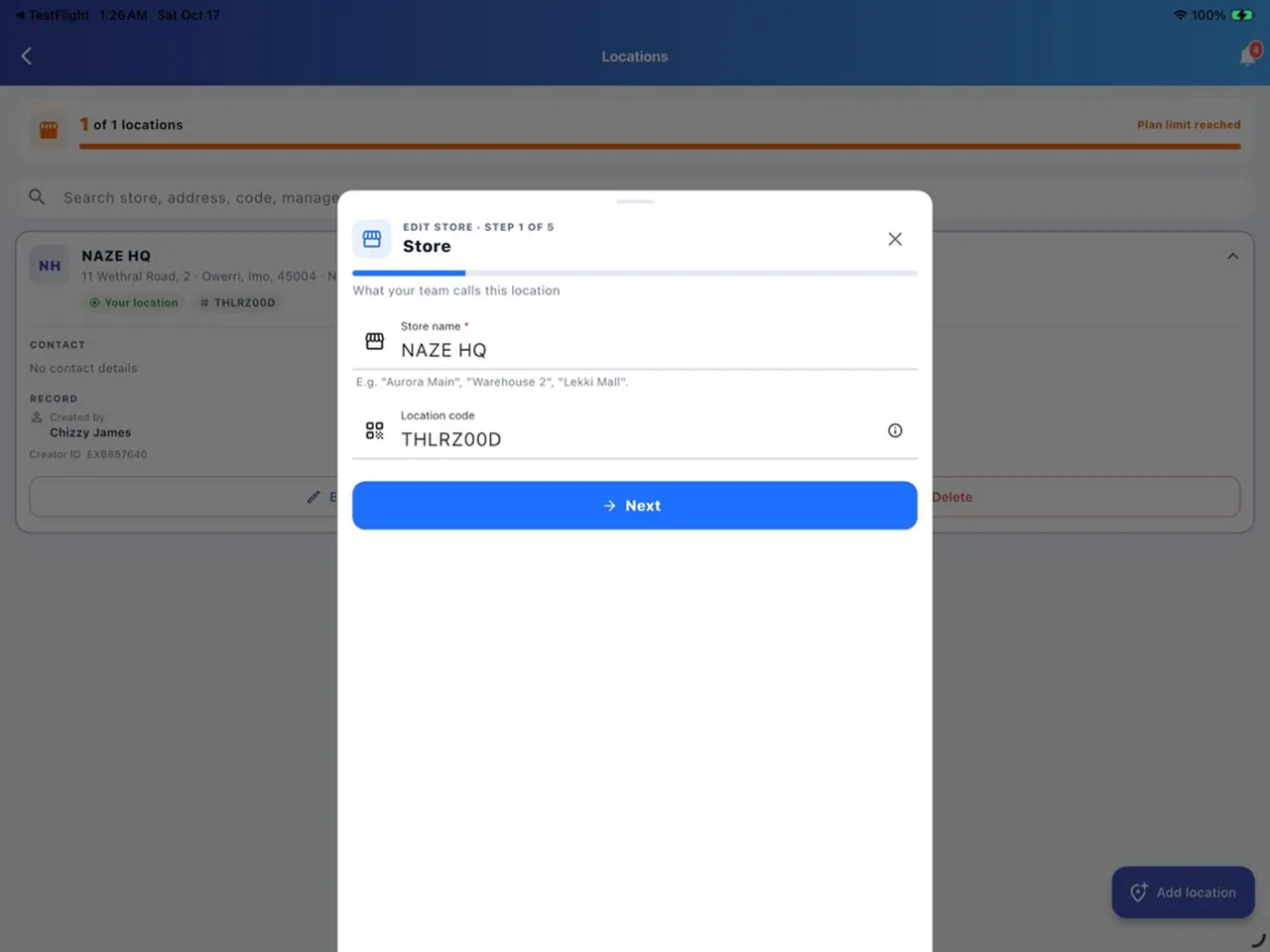
Stores & locations on iPad: Add each shop or warehouse with its name, address and location code.
Stores & locationsAdd each shop or warehouse with its name, address and location code.
Web app

Run the numbers from your desk.

The full Fixtock experience in your browser at app.fixtock.com: a side menu, your workspace and stores always in view, and step-by-step help for everyday tasks. Same live data as your team’s phones.

  • Menu, workspace and stores always in view
  • “How do I…?” guides that tick off each step as you go
  • Works on Windows, Mac, Linux and ChromeOS
  • Subscribe and manage your plan by card
Open web app or sign in
app.fixtock.com
Fixtock web app: Dashboard. 14-day overview with menu, workspace, stores and step-by-step help
Everything in one app

Built for how real businesses run.

From the stockroom to the sales floor to the books: one connected system instead of notebooks, spreadsheets and guesswork.

Inventory & batches

Products, variants, batches, expiry dates, costs and prices, with low-stock alerts before you run out.

Sales & returns

Fast, accurate sales with discounts and returns, each one timed, priced and linked to the seller.

Stock audits

Count the shelf, compare it with the app and fix differences with a clear adjustment trail.

Multi-store transfers

Send and request stock between locations, and always know what’s where.

Customers & balances

Customer profiles with unique IDs, what they owe, deposits and refunds.

Expenses & statements

Operating costs, loans, tax and assets, with clean statements of how money moved.

AI business insights

Plain-language reports and next steps drawn from your own numbers.

Teams & permissions

Invite staff with the right role. They see and do only what you allow.

Any currency & time zone

Each company sets its own currency and time zone for every figure and report.

Smart alerts

Low stock, transfers, audits, payments and a 7 AM summary of yesterday.

Receipts you can share

Save or share a receipt after every sale, straight from the till.

Keeps working on bad networks

Recent figures stay on screen when the connection drops, then refresh.

MADE FOR BUSINESSES THAT BUY, STORE AND SELL GOODS

  • Retail shops
  • Supermarkets
  • Pharmacies
  • Wholesalers
  • Distributors
  • Beverages & FMCG
  • Building materials
  • Fashion & beauty
  • Electronics
  • Agro & food
Get started in minutes

Up and running before your next sale.

Create your company

Download the app or open the web app, name your business, set your currency and add your stores.

Add stock & your team

Enter your products and quantities, then invite staff with the roles they need.

Sell and see

Record sales as they happen. Your stock, profit and insights update on their own.

Security & privacy

Your business data stays your business.

Fixtock is built on Google Cloud infrastructure with secure sign-in and strict per-company separation. We never sell your data.

  • Encrypted in transit and at rest.
  • Verified accounts: email and phone verification, with protected password resets.
  • Biometric unlock on phones and tablets.
  • Role-based access: each team member sees only what their role allows.
  • Full history: who did what, and when, for every change.
FAQ

Questions, answered.

Who is Fixtock for?

Retailers, wholesalers, pharmacies, supermarkets, distributors and any business that buys, stores and sells goods, anywhere in the world, from a single shop to several locations with a team.

Which devices does it work on?

iPhone, iPad and Android phones and tablets, plus any modern browser through the web app. Sign in with the same account everywhere and your data stays in sync.

Can I manage more than one store?

Yes. Add your locations, move stock between them and see figures per store or for the whole business. How many stores you can add depends on your plan.

Does it work in my country and currency?

Yes. Fixtock is available in 178 countries and regions, and works with every world currency. Each company chooses its own currency and time zone, and every figure, report and receipt uses them.

Can my staff use it without seeing everything?

Yes. Invite each person with a role. Viewers can only look, while Editors and Admins get more access. You stay in control as the Owner, and every action is recorded.

What happens if the internet drops?

Fixtock keeps showing your most recent figures and tells you they may be out of date, then refreshes as soon as you’re back online.

Who owns my data?

Your business does. We use it only to run Fixtock for you, never sell it, and you can ask for it to be deleted. Read the Privacy Policy for the details.

How much does it cost?

There’s a free plan to get started, and paid plans (Lite, Pro and Enterprise) for more stores, more stock items and advanced features. Pay through the App Store, Google Play or by card on the web, and cancel any time.

Run your business on numbers you can trust.

Start free on your phone, tablet or browser.

Get the app Sign in